> For the complete documentation index, see [llms.txt](https://docs.primeur.com/llms.txt). Markdown versions of documentation pages are available by appending `.md` to page URLs; this page is available as [Markdown](https://docs.primeur.com/panorama-2.0/dashboards/synchronization.md).
# Synchronization
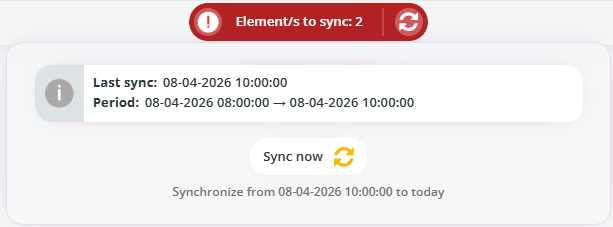
When data needs to be synchronized, a red button will appear at the top of the screen, just above the dashboard name.
Click the **exclamation mark icon** to view the **number of elements pending synchronization**.
Selecting the **Element/s to sync** label displays additional details, including the last synchronization time and the covered period.
Click the **refresh icon** next to the exclamation mark to update the number of elements to sync.
To start the synchronization process, click **Sync now**. Once the synchronization is completed and the system is fully aligned, the button turns **green**, indicating that no further action is required.
Details about data synchronization can be found on the [Data synchronization](/panorama-2.0/setup-and-configuration/data-synchronization.md) page.
Note that this feature is available to administrators or users with specific permissions.