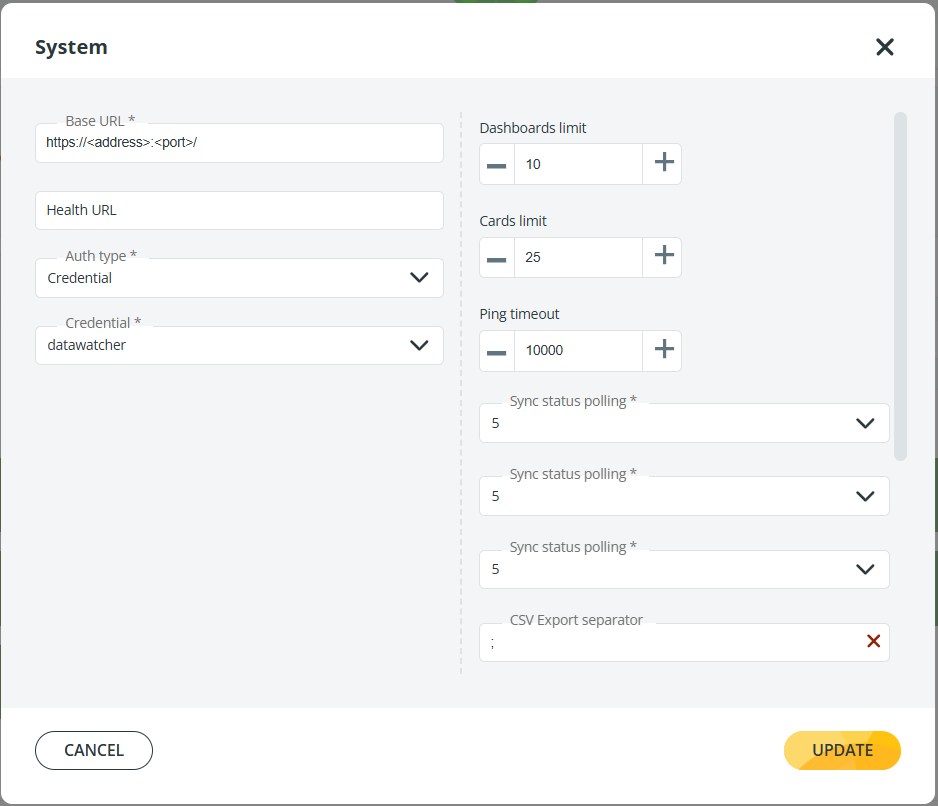
# Dashboards and cards limits
Administrators can configure the maximum number of dashboards and cards that each user can create in Panorama.
Follow these steps:
1. Go to **Setup** → **System** and click the **pencil icon** on the right.
2. In the **System** window, adjust the following settings:
* **Dashboards limit**: define how many **personal dashboards** each user can create (default: 10).\
Dashboards that are **shared with the user** do **not** increase this limit.
* **Cards limit**: set the maximum number of cards allowed on each dashboard (default: 25).
{% hint style="info" %}
If you enter a **number lower than the dashboards or cards currently available**, all existing dashboards and cards will remain, but new ones cannot be created.
{% endhint %}
3. Click **Update** to save your changes. The new settings take effect immediately, without requiring you to restart Panorama.
For details on the remaining settings in this window, refer to the [Set up the Data Watcher plugin](https://app.gitbook.com/s/foEoE9wUeqRuZEPjYoFD/install-panorama/running-the-system-for-the-first-time/launching-panorama/set-up-the-data-watcher-plugin) page of the installation guide.