# Email templates
The **Email Template** section lists the templates used in emails sent to users when configured Data Watcher events occur. Different templates can exist and are applied to each specific event.
To upload one or more Data Watcher templates, follow these steps:
1. Edit the template using an HTML editor tool outside Data Watcher.
2. In Data Watcher, go to **Setup** → **Email Templates** and click the **UPLOAD** button.
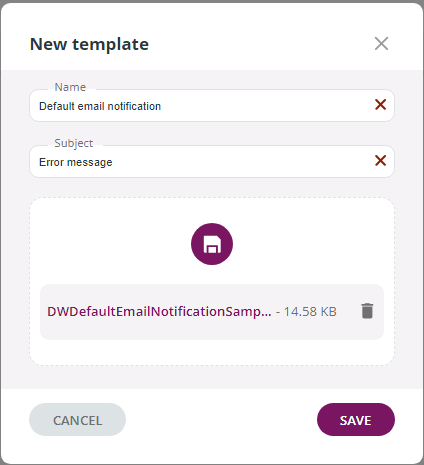
3. In the **New template** window, assign a **Name** to the template (this will appear in the list of results) and enter a **Subject** (this is the Subject of the email that users will receive).
4. Click the **UPLOAD** button to load the edited template browsing your local disk.
5. Click the **SAVE** button to confirm.
Your template will appear in the list of results and in the drop-down list of the **Notification Channel** window.
To delete a template, click the three-dot icon and select the **Delete** option.
When Data Watcher is in a bundle with Data Mover, the procedure is similar and you can find it on the [Email Templates](/data-mover-1.21/notification-channels/manage-templates/email-templates.md) page.
---
# Agent Instructions: Querying This Documentation
If you need additional information that is not directly available in this page, you can query the documentation dynamically by asking a question.
Perform an HTTP GET request on the current page URL with the `ask` query parameter:
```
GET https://docs.primeur.com/data-watcher-1.21/setup/email-templates.md?ask=
```
The question should be specific, self-contained, and written in natural language.
The response will contain a direct answer to the question and relevant excerpts and sources from the documentation.
Use this mechanism when the answer is not explicitly present in the current page, you need clarification or additional context, or you want to retrieve related documentation sections.