# Notifications
When modeling a flow, you can configure notifications to alert users when specific events occur.
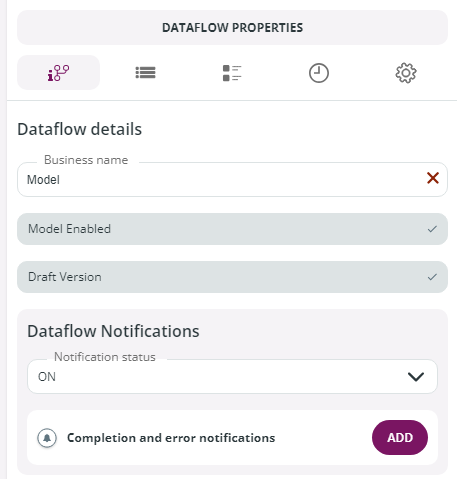
Navigate to **Dataflow Models** → **New** or **Edit** and go to the **Dataflow Properties** panel.
In the **Dataflow Notifications** section, go to **Completion and error notifications** and click **Add**.
To configure the new notification, in the **New notification** window, provide the following details:
* **Name**: enter an internal name for the event notification.
* **Events**: select one or more events that will trigger the notification. Available options:
* **Flow Complete**
* **Flow Error**
* **Business Error** (requires a specific license)
**Note:** For **Flow Error** with multi-instance cut-offs, notifications are sent only for the dataflows that generate the error. For example, if one out of three dataflows fails, only that failure triggers a notification.
* **Notification Channels**: choose the channel for sending notifications.
* **Add Email**: enter the email address of individual users or a group (mailing list), then click **+** to add.
Click **Confirm** to finalize and configure the notification.
See below an example of Notifications set with the System email notification channel.\
In this example Buzz Aldrin and Neil Armstrong will receive an email informing them that the flow was completed successfully.
## Dataflow notifications management
Dataflow notifications can be switched on or off in 2 distinct locations:
1. On the **Dataflow Properties panel** described above, selecting ON or OFF in the Notification status section.
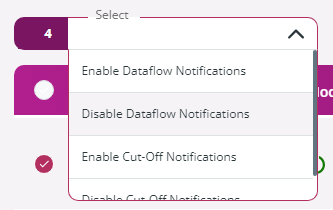
2. On the **Dataflow Models** page, by clicking the 3-dot icon on the right of the model and selecting **Enable Dataflow Notifications** or **Disable Dataflow Notifications**.\
If you select multiple models, multiple dataflow notifications can be set in one go by going to the **Select** drop-down menu and choosing the **Enable Dataflow Notifications** or the **Disable Dataflow Notifications** entry.
---
# Agent Instructions: Querying This Documentation
If you need additional information that is not directly available in this page, you can query the documentation dynamically by asking a question.
Perform an HTTP GET request on the current page URL with the `ask` query parameter:
```
GET https://docs.primeur.com/data-watcher-1.21/model/notifications.md?ask=
```
The question should be specific, self-contained, and written in natural language.
The response will contain a direct answer to the question and relevant excerpts and sources from the documentation.
Use this mechanism when the answer is not explicitly present in the current page, you need clarification or additional context, or you want to retrieve related documentation sections.