# Viewing and managing cut-offs
## **Dataflow cut-offs**
Existing cut-offs for dataflows are listed in the **Data Modeler** → **Dataflow Properties** panel.
To view them:
1. Select the  clock icon.
2. The cut-offs will be displayed as shown in the figure below.
3. To enable or disable notifications, use the **ON/OFF** toggle in the drop-down list.
## **Node cut-offs**
Existing cut-offs are also available at the node level. To access them:
1. In **Data Modeler**, click on the desired node card.
2. In the **Node Properties** panel, select the  clock icon.
3. Both **Planned** and **Duration** cut-offs will be listed in the same format.
## Managing cut-off notifications
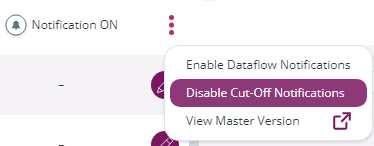
Cut-off notifications can be switched on or off by clicking the 3 dots icon on the **Dataflow Models** page and selecting **Enable Cut-off notifications** or **Disable Cut-off notifications**.
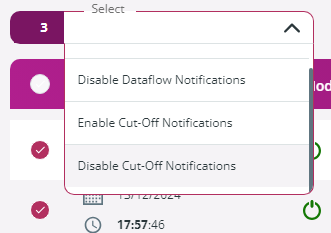
If you select multiple models, you can set multiple cut-offs in one go by going to the Select drop-down menu and choosing the Enable Cut-Off Notifications or **Disable Cut-Off Notifications** entry.
---
# Agent Instructions: Querying This Documentation
If you need additional information that is not directly available in this page, you can query the documentation dynamically by asking a question.
Perform an HTTP GET request on the current page URL with the `ask` query parameter:
```
GET https://docs.primeur.com/data-watcher-1.21/model/cut-offs/viewing-and-managing-cut-offs.md?ask=
```
The question should be specific, self-contained, and written in natural language.
The response will contain a direct answer to the question and relevant excerpts and sources from the documentation.
Use this mechanism when the answer is not explicitly present in the current page, you need clarification or additional context, or you want to retrieve related documentation sections.