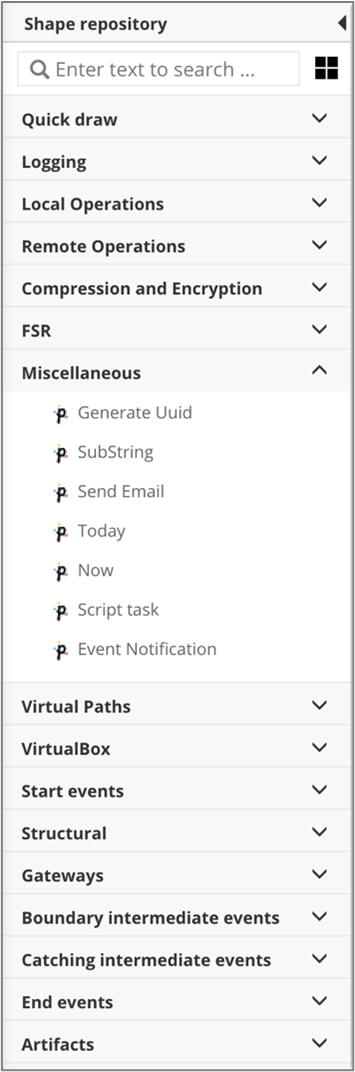
# Workflow template Shape repository panel
This panel contains all service tasks. To use them, simply drag the single service task from the **Shape Repository** panel and drop it on the [working area](broken://pages/Y9o9N5LXJ4vW4wNbqSbc).
## Primeur service tasks
Primeur service tasks are described in the [Service tasks](/data-mover-1.21/workflow-templates/service-tasks.md) section.
## BPMN elements
When creating a workflow in Data Mover, these BPMN elements are useful:
* **None events**, i.e., Start event and End event
* **Sequence flows**
* **Gateways**, i.e., Inclusive gateway, Exclusive gateway and Parallel gateway
* **Boundary intermediate events**, i.e., Timer boundary event and Error boundary event
### None events
#### **Start event**
The untyped start event is also called the None Start Event. The start event is the most common type of event. Processes that start with such an event are created without any pre-conditions. It is common to use this event when a user starts a process through a graphical user interface.
#### **End event**
The untyped end event typically marks the typical end of a process.
### Sequence flows
*A Sequence Flow is used to show the order of Flow Elements in a Process or a Choreography. Each Sequence Flow has only one source and only one target. The source and target MUST be from the set of the following Flow Elements: Events (Start, Intermediate, and End), Activities (Task and Sub-Process; for Processes), Choreography Activities (Choreography Task and Sub-Choreography; for Choreographies), and Gateways.*\
— BPMN 2.0.2 Standard, 8.4.13, Sequence Flow
There are a number of ways to connect elements in BPMN. However, by far the most common one within executable business processes is the **Sequence Flow.**
A sequence flow is the connector between two elements of a process. After an element is visited during process execution, all outgoing sequence flows are followed. This means that the default nature of BPMN 2.0 is to be parallel: two outgoing sequence flows create two separate, parallel paths of execution.
A sequence flow can have a condition defined. When a BPMN 2.0 activity is left empty, the default behavior is to evaluate the conditions on the outgoing sequence flow. When a condition evaluates to true, that outgoing sequence flow is selected. When multiple sequence flows are selected that way, multiple executions are generated and the process is continued in a parallel way.
The above holds for BPMN 2.0 activities (and events), but not for gateways. Gateways handle a sequence flow with conditions in specific ways, depending on the gateway type.
A condition defined on a gateway must be an **expression** and must always evaluate either to the Boolean value `true` or `false`.
All BPMN 2.0 tasks and gateways can have a default sequence flow. This sequence flow is only selected as the outgoing sequence flow for that activity if and only if none of the other sequence flow can be selected. Conditions on a default sequence flow are always ignored.
### Gateways
*Gateways are used to control how the Process flows (how Tokens flow) through Sequence Flows as they converge and diverge within a Process. If the flow does not need to be controlled, a Gateway is not needed. The term “gateway” implies that there is a gating mechanism that either allows or disallows passage through the Gateway; that is, as tokens arrive at a Gateway, they can be merged together on input and/or split apart on output as the Gateway mechanisms are invoked.*
— BPMN 2.0.2 Standard, 10.6, Gateways
Gateways are used to control the flow of a process. While the standard also allows branching without the use of gateways, using gateways greatly improves the understanding of a process model.
#### **Exclusive gateway**
*A diverging Exclusive Gateway (Decision) is used to create alternative paths within a Process flow. This is basically the "diversion point in the road" for a Process. For a given instance of the Process, only one of the paths can be taken.*\
— BPMN 2.0.2 Standard, 10.6.2, Exclusive Gateway
\
\
Exclusive gateways are one of the most common sights within a process model. They are used to model decisions within a process.
To decide which route the process follows, the **conditions** on the outgoing Sequence Flows are checked. The conditions are modeled as an expression and must always evaluate to a boolean value of `true` or `false`. It is important to understand that the conditions of an exclusive gateway are **not** modeled on the gateway itself but rather on the outgoing sequence flows.
If more than one condition evaluates to `true`, the path that was defined first is chosen. This should obviously never happen. If no condition evaluates to `true`, the process is stuck.
There is the possibility to mark a Sequence Flow as **Default Flow**. If you do so, the flow follows this route if no condition matches.
#### **Inclusive gateway**
*A diverging Inclusive Gateway (Inclusive Decision) can be used to create alternative but also parallel paths within a Process flow. Unlike the Exclusive Gateway, all condition Expressions are evaluated. The true evaluation of one condition Expression does not exclude the evaluation of other condition Expressions. All Sequence Flows with a true evaluation will be traversed by a token. Since each path is considered to be independent, all combinations of the paths MAY be taken, from zero to all. However, it should be designed so that at least one path is taken.*\
— BPMN 2.0.2 Standard, 10.6.3, Inclusive Gateway
Inclusive gateways are used to model decisions where one or more paths can be taken.
To decide which route(s) the process follows, the **conditions** on the outgoing Sequence Flows are checked. The condition is modeled as an expression and must always evaluate to a boolean value of `true` or `false`. It is important to understand that the conditions of an inclusive gateway are **not** modeled on the gateway itself but rather on the outgoing sequence flows.
Every time a condition evaluates to `true` or if a Sequence Flow has no condition, the process branches at that position. If no condition evaluates to `true` or if there is no Sequence Flow without a condition, the process is stuck.
To join inclusive branches, use another inclusive gateway. The execution only continues once all paths have been completed.
#### **Parallel gateway**
*A Parallel Gateway is used to synchronize (combine) parallel flows and to create parallel flows. A Parallel Gateway creates parallel paths without checking any conditions; each outgoing Sequence Flow receives a token upon execution of this Gateway. For incoming flows, the Parallel Gateway will wait for all incoming flows before triggering the flow through its outgoing Sequence Flows.*\
— BPMN 2.0.2 Standard, 10.6.4, Parallel Gateway
Parallel gateways are used to model situations where more than one path is executed in parallel. These gateways do not have any conditions since all paths are always executed. To join parallel branches, use another parallel gateway. The execution only continues once all paths have been completed.
### Boundary intermediate events
#### **Timer boundary event**
The process execution is delayed until a certain point in time is reached or a particular duration is over.
#### **Error boundary event**
It catches a named error, which is thrown by an inner scope (for example, a sub-process). This event must be attached to the boundary of an activity.
---
# Agent Instructions: Querying This Documentation
If you need additional information that is not directly available in this page, you can query the documentation dynamically by asking a question.
Perform an HTTP GET request on the current page URL with the `ask` query parameter:
```
GET https://docs.primeur.com/data-mover-1.21/workflow-templates/user-designed-workflow-templates/editing-a-user-designed-workflow-template/workflow-template-shape-repository-panel.md?ask=
```
The question should be specific, self-contained, and written in natural language.
The response will contain a direct answer to the question and relevant excerpts and sources from the documentation.
Use this mechanism when the answer is not explicitly present in the current page, you need clarification or additional context, or you want to retrieve related documentation sections.