# Actor Lineage

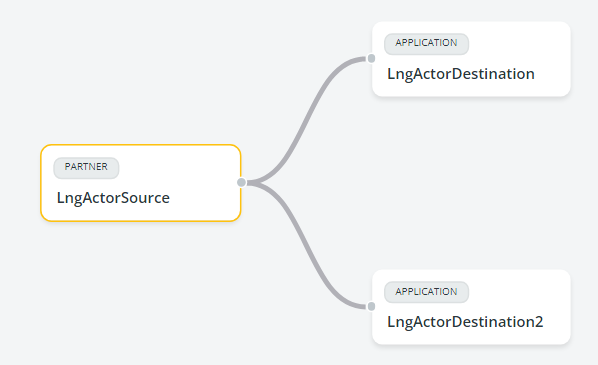
In Data Mover, actor lineage refers to the process of **tracing the configured complete flows of data from a source actor to one or more destination actors**, which must be different from the source actor. As the level of detail increases, the actor lineage offers a comprehensive perspective on the flow, showing the complete configuration, and covering all contracts and protocols configured within them.

This feature is particularly useful for simplifying troubleshooting and data analysis since the lineage always shows the full path, from a source actor to a destination actor or actors and there will never be a flow in the configured path that starts from an actor and stops in the middle of the mediation.

In a setup involving **two Data Mover actors**, the configuration includes these key components:

* A **source actor**, with an input configuration that can be either an input contract or a connection contract.
* One or more **mediation contracts** that manage the interaction between the source and destination actor.
* A **destination actor**, with an output configuration that is either an output contract or a connection contract.

The lineage goes down to an **increasing level of detail**. It starts with a general view of the source actor and the destination actors to which it is connected. From there, users can access more details showing the flow. Finally, more information is displayed with all the details, from the template used to the individual configurations chosen when creating the flow.

{% hint style="warning" %}
Only mediation contracts that use "sourceVirtualPath" as the variable name for the starting virtual path are suitable for identifying the complete flow. Mediation contracts that use custom names for virtual path variables will not be tracked in lineage.
{% endhint %}

### Accessing the actor lineage

To access the Actor lineage functionality, go to **Actors**, click the 3 dots button on the actor row, and select the **Lineage** option. A specific license is needed to see this menu.

<figure><img src="https://files.readme.io/1e6a9e02648feca81103a2e87ac4854ada1f827250a3476917022cc46bfeb02c-image.png" alt=""><figcaption></figcaption></figure>

After selecting the **Lineage** option, a screen will show the source actor and its single or multiple destinations. In this latter case, an arrow starts from the source and goes to each destination. Each arrow represents a distinct action toward one of the destinations, creating a one-to-one correspondence between the source of the arrows and the destinations to which they are directed.

<figure><img src="https://files.readme.io/125ef806aeef684cf36da1f0a53858971cc53b4a1da3e9be60eae3847337f839-image.png" alt="" width="375"><figcaption><p>Actor with single destination</p></figcaption></figure>

<figure><img src="https://files.readme.io/b796a877c3b2ef17433a4dfeb8c6420bde93a2dc2ded0b852f81b9b6d35d94a3-image.png" alt="" width="375"><figcaption><p>Actor with multiple destinations</p></figcaption></figure>

Clicking on a single source or destination, details are displayed in a panel appearing on the right. This is the information shown:

* **Actor**: name of the actor involved
* **Type**: type of actor, i.e. Application or Partner
* **Description**: description of the actor, entered upon its creation
* **Last update**: if applicable, the date of the last update is given

Read the following pages for the details about Actor Lineage:

* [Aggregation of flows by protocol](/data-mover-1.21/actors/actor-lineage/aggregate-flows-by-protocol.md)
* [Lineage with connection contracts](/data-mover-1.21/actors/actor-lineage/lineage-with-connection-contracts.md)
* [Lineage with input, mediation, and output contracts](/data-mover-1.21/actors/actor-lineage/lineage-with-input-mediation-and-output-contracts.md)
* [Lineage with any contract type](/data-mover-1.21/actors/actor-lineage/lineage-with-any-contract-type.md)

### Exporting diagrams

All diagrams can be exported in SVG format by clicking the <img src="https://files.readme.io/3006a2c07978ff63bfec6073956018510c591db65ac9087809cea6223216dd7a-image.png" alt="" data-size="line"> icon in the upper right corner.


---

# Agent Instructions: Querying This Documentation

If you need additional information that is not directly available in this page, you can query the documentation dynamically by asking a question.

Perform an HTTP GET request on the current page URL with the `ask` query parameter:

```
GET https://docs.primeur.com/data-mover-1.21/actors/actor-lineage.md?ask=<question>
```

The question should be specific, self-contained, and written in natural language.
The response will contain a direct answer to the question and relevant excerpts and sources from the documentation.

Use this mechanism when the answer is not explicitly present in the current page, you need clarification or additional context, or you want to retrieve related documentation sections.